Reporting Company Setup
Before generating Metro 2® files, you must configure your Reporting Company settings. This information identifies your company to the credit bureaus and pre-fills default values when creating new accounts.
How To Set Up Your Reporting Company Information
Access the Reporting Company settings by clicking Settings in the left sidebar, then selecting the Reporting Company sub-tab.
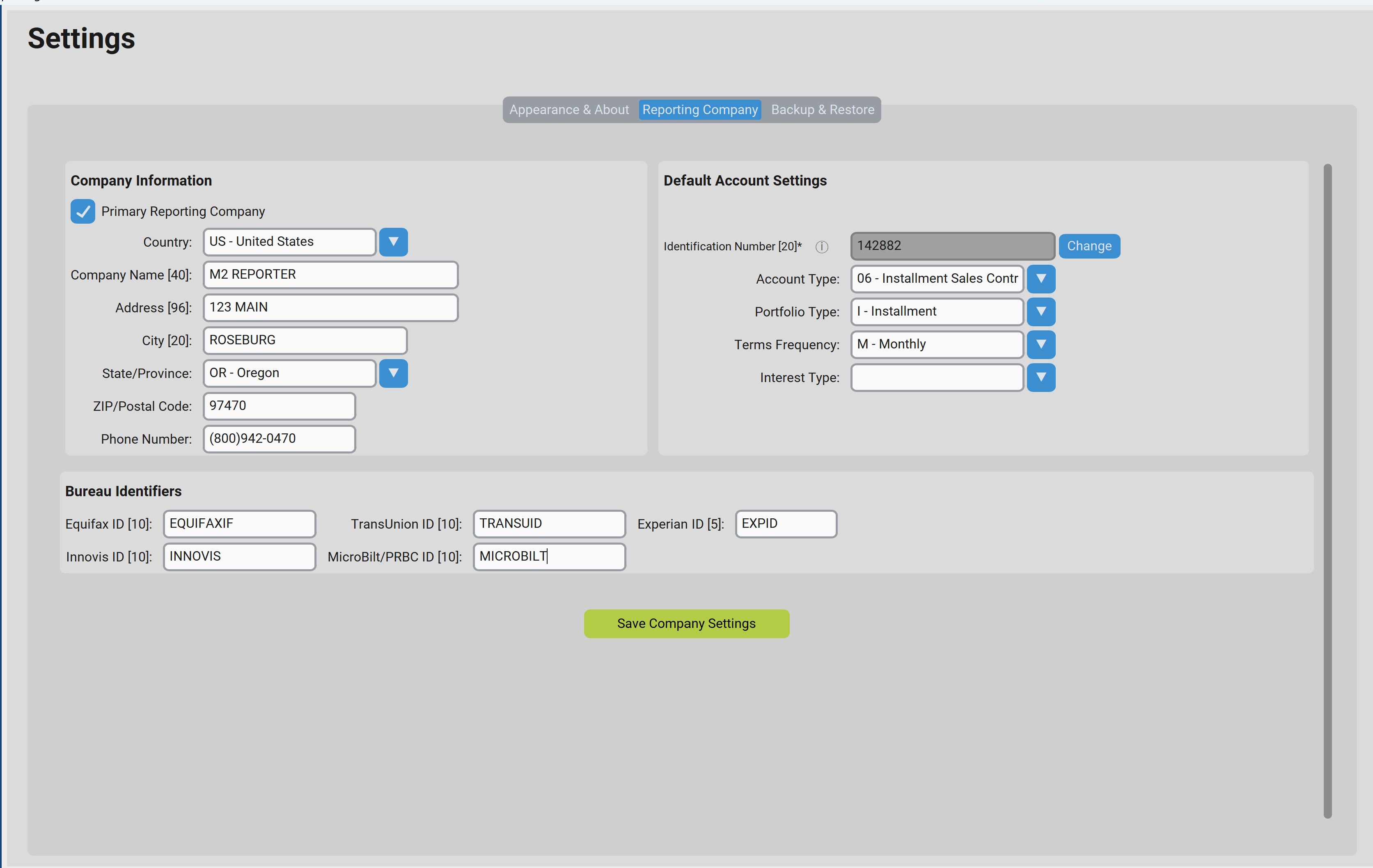
Figure 4: Reporting Company Settings
Company Information
| Field | Description | Max Length |
|---|---|---|
| Country | Select from dropdown (US – United States is the default) | — |
| Company Name | Your business name as registered with the credit bureaus | 40 |
| Address | Street address including suite or unit numbers | 96 |
| City | City name | 20 |
| State/Province | Select from dropdown | — |
| ZIP/Postal Code | 5 or 9 digit ZIP code | 10 |
| Phone Number | Company phone number | 10 |
Default Account Settings
These defaults are automatically applied when creating new accounts, saving time on data entry. All defaults can be overridden on a per-account basis inside M2R.
| Field | Description |
|---|---|
| Identification Number | A unique code (5–20 digits) that you create. This code is registered with your credit bureau account(s) on the first Metro 2® report upload. |
| Account Type | The default type of accounts you report (e.g., 02 – Secured) |
| Portfolio Type | The default portfolio category (I – Installment, R – Revolving, M – Mortgage, etc.) |
| Terms Frequency | How often payments are due (M – Monthly, W – Weekly, etc.) |
| Interest Type | Whether accounts carry fixed, variable, or no interest rates |
Bureau Identifiers
Enter the subscriber codes issued to you by each credit bureau. These codes identify your company when submitting data. At least one bureau ID is required.
| Bureau | ID Length | Note |
|---|---|---|
| Equifax | 10 characters | Don't Know your Identifier? Contact your bureau representative. |
| TransUnion | 10 characters | Don't Know your Identifier? Contact your bureau representative. |
| Experian | 5 characters | Don't Know your Identifier? Contact your bureau representative. |
| Innovis | 10 characters | Don't Know your Identifier? Contact your bureau representative. |
| MicroBilt/PRBC | 10 characters | Don't Know your Identifier? Contact your bureau representative. |
Saving Your Settings
After entering all required information, click the Save Company Settings button. Your settings are stored and will be used for all Metro 2® files you generate going forward.